
What Happens When a Domain Expires? The Timeline Nobody Explains
An expired domain doesn't disappear the same day. For .com, .net and .org it moves through stages before anyone else can register it — and which stage you're in decides whether recovery costs a normal renewal, a large redemption fee, or isn't possible at all.
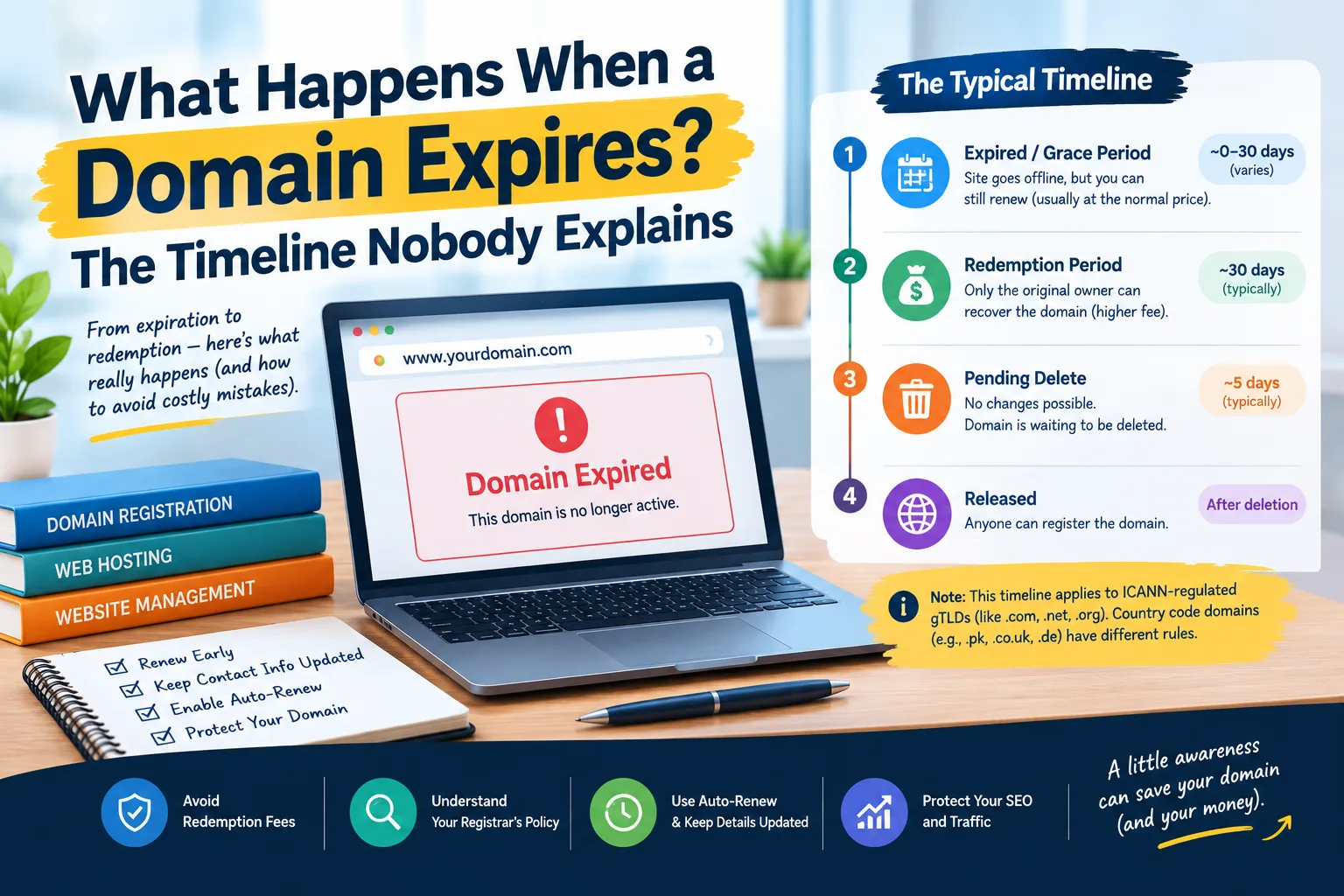
A domain expiring does not usually mean it disappears that same day.
For popular gTLDs like .com, .net, and .org, an expired domain goes through stages before deletion. Then, it can be registered by someone else. The timing can vary by registrar. However, the process allows the original owner to recover the domain before it is lost for good.
The important part is knowing which stage your domain is in.
If you catch the problem soon after expiration, you may simply pay the normal renewal fee. If the registrar has deleted the domain, it enters the Redemption Grace Period. Recovering it can then cost much more. After the final deletion stage, you may not be able to recover it at all.
This article covers the usual lifecycle of ICANN-regulated gTLDs, like .com, .net, and .org. Country-code domains like .pk, .co.uk, and .de have different rules. So, don't assume this timeline works for all domain extensions.
The Domain Expiration Timeline
Here is the simplified version of what can happen to an expired gTLD:
| Stage | Typical timing | What happens |
|---|---|---|
| Expired / post-expiration period | Often days to weeks | Website and email may stop working; renewal may still be possible |
| Redemption Grace Period | 30 days after deletion | Original registrant can generally request restoration through the registrar, usually with an additional fee |
| Pending Delete | About 5 days | The domain cannot normally be restored or changed |
| Released | After deletion | The domain becomes available for registration under the registry's rules |
There is an important detail behind this table.
The first stage does not have one universal 30-day duration.
ICANN's policy lets registrars delete expired registrations, following certain rules. Also, registrars may have different procedures after expiration. ICANN requires specific renewal notices. It also mandates that registrars allow renewals during the renewable period.
The Redemption Grace Period lasts 30 days. It starts after a domain is deleted in participating gTLD registries.
So if your domain has expired today, don't assume you have exactly 30 days to act.
Check your registrar's expiration and deletion policy immediately.
Stage 1: Your Domain Expires
The expiration date is the end of the registration term you paid for.
But expiration does not necessarily mean the domain is immediately released to somebody else.
Depending on the registrar's policy, you may still be able to renew the domain after the expiration date. Some registrars provide a post-expiration renewal period, sometimes called an auto-renew grace period.
During this period, the domain may no longer work normally.
Your website can stop loading.
Your email addresses can stop receiving messages.
The registrar may replace your website with a parking or expiration page.
That is why an expired domain can look "dead" even though it has not yet been permanently lost.
For a business, this distinction matters. The domain can still be recoverable while the website and email are already causing real problems.
What Happens to Your Website After Expiration?
One of the first things you may notice is that the website stops resolving normally.
When the domain's DNS resolution is interrupted, browsers can no longer reach the website using that domain name.
Email can be affected too.
If your business uses addresses like hello@example.com, sales@example.com, or name@example.com, those addresses depend on the domain working too.
The result can be more serious than simply having a website offline for a few hours.
You could miss customer enquiries.
Password-reset emails may not arrive.
Transactional messages can fail.
Forms connected to your domain may stop working.
The registrar may also redirect the domain to a parking or expiration page. ICANN's expired-registration policy says the DNS resolution path must stop. This happens during the post-expiration period. If a registrar sends web traffic to a page, that page must show the domain has expired and include renewal instructions.
Can an Expired Domain Hurt SEO?
Yes, the effect largely depends on how long the domain is unavailable and how search engines find out about it.
If your website disappears, search engines cannot crawl your pages normally.
A short interruption is different from allowing the domain to remain expired for weeks.
The longer the site is down, the higher the risk to rankings, indexed pages, and organic traffic.
There is another issue: your backlinks still point to your domain.
If the domain eventually disappears or someone else registers it, those links may no longer lead to your original content.
This is particularly important for established websites that have spent years building authority.
If your website is slow or down, it's helpful to tell if the issue is with hosting or with the domain/DNS. Our guide on whether hosting is actually causing a slow website covers the diagnostic side of that question.
Why Didn't Auto-Renew Save My Domain?
A lot of people assume auto-renew means they never have to think about their domain again.
Unfortunately, auto-renew depends on several things working correctly.
The most obvious failure is an expired payment method.
Your card may have expired.
The bank may have declined the transaction.
A payment method may have been removed.
The account may have insufficient funds.
But payment is not the only issue.
Your registrar account may contain an old email address. You might have changed jobs, stopped using an old mailbox or simply forgotten which address was attached to the domain.
ICANN asks gTLD registrars to send renewal reminders about one month and one week before expiration. They also need to send another notice in specific post-expiration cases. If the contact information is outdated, those messages may never reach you.
This is why your registrar contact email should be treated as important account infrastructure.
Stage 2: Redemption Grace Period
This is where the situation becomes more expensive.
If the registrar deletes the domain, it enters a 30-day Redemption Grace Period. This period is for eligible domains.
The domain isn't working right in DNS. It can't be easily moved to another registrar. However, the original registrant can request restoration through the registrar that deleted it.
This is the point where people sometimes receive a surprisingly large invoice.
You may have expected to pay a normal $10–$15 renewal.
Instead, you may see a restoration or redemption charge that is many times higher.
The exact amount is registrar- and domain-specific. A redemption fee can range from tens to hundreds of dollars. Something like $80–$200 is just one example, not a standard ICANN fee.
ICANN does not set one standard redemption price for every registrar.
Registrars must make renewal, post-expiration, and redemption fees easy for registrants to find.
This ties directly to our article, Why Did My Hosting Renewal Price Triple? Domain registration and renewal fees can vary a lot. They often differ between introductory, normal, and recovery prices. So, always check the invoice before paying.
Stage 3: Pending Delete
If the domain isn't restored in the Redemption Grace Period, it usually goes to final deletion. For common gTLD lifecycle rules, this is generally around 5 days.
ICANN's EPP documentation explains that pendingDelete is the stage after the redemption period. This happens when the domain has not been restored. After several days, it is purged from the registry database.
This is the point where there is normally no ordinary recovery option.
The domain is waiting to be deleted.
You cannot simply pay a redemption fee and bring it back during this stage.
That is why acting during the earlier stages matters.
Stage 4: The Domain Is Released
After the pending-delete period, the domain is taken out of the registry. It then becomes available for registration based on the registry's rules.
At that point, you are no longer simply renewing your old domain.
You are trying to register a domain that has become available again.
And someone else may get there first.
Why Valuable Expired Domains Can Disappear Quickly
Not every expired domain is attractive.
An established domain has years of backlinks. It also has mentions, traffic, and brand history.
Some expired domains grab the attention of people. They also interest companies that watch for released domains.
Automated drop-catching systems can attempt to register domains immediately when they become available.
This does not mean every expired domain will be taken.
A small local website with limited links may attract very little attention.
If a domain has strong backlinks or a well-known name, don't assume you can register it again after deletion.
There is no guarantee that an expired domain will still be available when you return to it.
What About .pk, .co.uk and .de?
This is one of the most important warnings in the entire topic.
The timeline above is primarily about ICANN-regulated gTLDs.
A .com domain and a .pk domain do not necessarily follow the same expiration and deletion process.
Country-code top-level domains, or ccTLDs, are managed under their own registry policies. The same applies to other specialised domain extensions.
If your domain ends in .pk, .co.uk, .de, or another country-code extension, check the rules. Look at both the registry and your registrar.
Do not assume that "30 days after expiry" applies everywhere.
The safest rule is simple:
Check the registrar's policy on expiration and deletion. Use it for your domain extension.
How to Stop Your Domain From Expiring
The good news is that domain expiry is usually preventable.
1. Turn on auto-renew
Auto-renew is one of the easiest protections available.
But don't enable it and forget about it.
Make sure the payment method remains valid.
2. Keep your registrar email current
Use an email address that you actually monitor.
Try using a registrar contact address that isn't tied to the domain.
If your only email is you@yourdomain.com and that domain expires, you might lose access. This could mean missing renewal warnings sent to that mailbox.
A separate, reliable email account is a much safer choice for registrar notices.
3. Add a calendar reminder
Set reminders well before the expiration date.
A reminder 30 days before expiry gives you time to check payment details and renewal pricing.
Another reminder a week before expiry gives you a second opportunity to catch a problem.
4. Consider multi-year registration
If you plan to use the domain for several years, register it for multiple years. This way, you lower the chance of forgetting to renew it.
It doesn't remove the need for accurate account info. However, it gives you more time before making renewal decisions.
5. Keep the domain locked
A registrar lock can help prevent unauthorised transfers.
It's not a substitute for renewal reminders. However, it's a smart way to enhance account security.
6. Know your renewal price
Do not assume the price you paid when registering the domain is the price you will pay forever.
Promotional registration rates can be significantly lower than renewal prices.
Check what the registrar will charge for another year before the expiration date.
What Should You Do If Your Domain Has Already Expired?
Don't panic, and don't immediately assume you have lost it.
First, log in to your registrar account.
Check the domain's current status.
Look for terms such as:
- Expired
- Auto-renew grace period
- Redemption period
- Redemption grace period
- Pending delete
- Pending renewal
Then check the exact renewal or restoration price.
If the domain matters for your business, reach out to the registrar. Ask them about the current stage and the final recovery date.
Do not rely on a generic internet timeline when the registrar can tell you the actual status of your domain.
The Bottom Line
A domain does not normally go from "expired" to "available to everyone" in one step.
For common gTLDs, there's a post-expiration period. After that, a 30-day Redemption Grace Period starts once the domain is deleted. Finally, there's a pending-delete period before the domain is released.
But the first stage is not a universal 30-day grace period. Registrar policies and domain extensions matter.
The safest way is to renew before it expires. Keep auto-renew on, use a working payment method, and have a separate email. This email should stay accessible, even if the domain stops working.
And if your domain has already expired, check its status immediately.
The difference between renewing at the normal rate and recovering a deleted domain can be hundreds of dollars. Once the pending-delete stage ends, someone else might grab the domain.
If you're checking your website's hosting, visit our Web Hosting section. It has helpful tips on hosting, servers, and managing your website.
Provider Disclaimer
Provider names mentioned in examples are for illustration only, not recommendations. Nobody pays to be named here.
Common questions
What happens immediately after a domain expires?
The domain does not normally become available for anyone else immediately. The registrar's policy may allow a post-expiration renewal period. During this time, the original registrant can still renew the domain. Website and email services may already stop working, however.
Can I renew my domain after the expiration date?
Often, yes, especially during the registrar's post-expiration renewal period. The rules, timing, and price vary by registrar and domain extension. So, check the domain's current status instead of assuming a fixed grace period.
How long after expiration can I recover a domain?
There is no single universal recovery period for every domain. For eligible gTLDs, a 30-day Redemption Grace Period starts. This happens when the registrar deletes the domain. However, the time before deletion can differ.
What is a Redemption Grace Period?
It's a 30-day period after deletion. The original registrant can often ask the registrar to restore an eligible gTLD domain during this time. The domain is not active in DNS during this period.
Why is domain redemption so expensive?
Redemption is a recovery process rather than a normal renewal. Registrars may add a restoration fee. This fee differs by registrar and domain extension. ICANN says redemption fees must be easy for registrants to access, but it doesn't set a single price.
Does an expired domain still work?
It may stop working soon after expiration, depending on the registrar's process. DNS resolution for a website can fail. This may also disrupt email services tied to the domain. The domain can still be recoverable even while the website is offline.
Can an expired domain hurt SEO?
Yes, particularly if the website remains inaccessible for an extended period. Search engines might not crawl the site. Users also can't find pages in search results. The longer the interruption continues, the greater the potential SEO and traffic impact.
What happens to email when a domain expires?
Email addresses using the domain can stop functioning when DNS services are interrupted. This can cause problems. Incoming messages, outgoing mail, and other services that rely on the domain may fail. For businesses, the email impact can be as serious as the website downtime.
Can someone else register my expired domain?
Yes, but that's usually after the domain's deletion process is complete and it's available again. Automated registration systems might target valuable domains. So, you can't be sure you'll register that domain again.
What is Pending Delete?
Pending Delete is the last step before a domain is taken out of the registry. For common gTLD lifecycle rules, this stage lasts about five days. During this time, the domain usually cannot be restored.
Do .pk and .com domains follow the same expiration process?
Not necessarily. .com is a gTLD that follows ICANN's policies. In contrast, .pk is a country-code domain with its own registry rules. Always check the rules for your domain extension. Use the right registrar or registry.
What should I do if my domain has already expired?
Log in to your registrar immediately and check the domain's current status. Check if it's still renewable, in a redemption period, or close to deletion. Ask the registrar for the final recovery date and the fee.