
Your Site Is Slow — Is It the Host or Your Site?
When a site feels slow, the host gets blamed first. Sometimes that is fair. Often it isn't. Here is how to test the server separately from the site, so you don't pay for a VPS when the real problem is a 5 MB homepage.
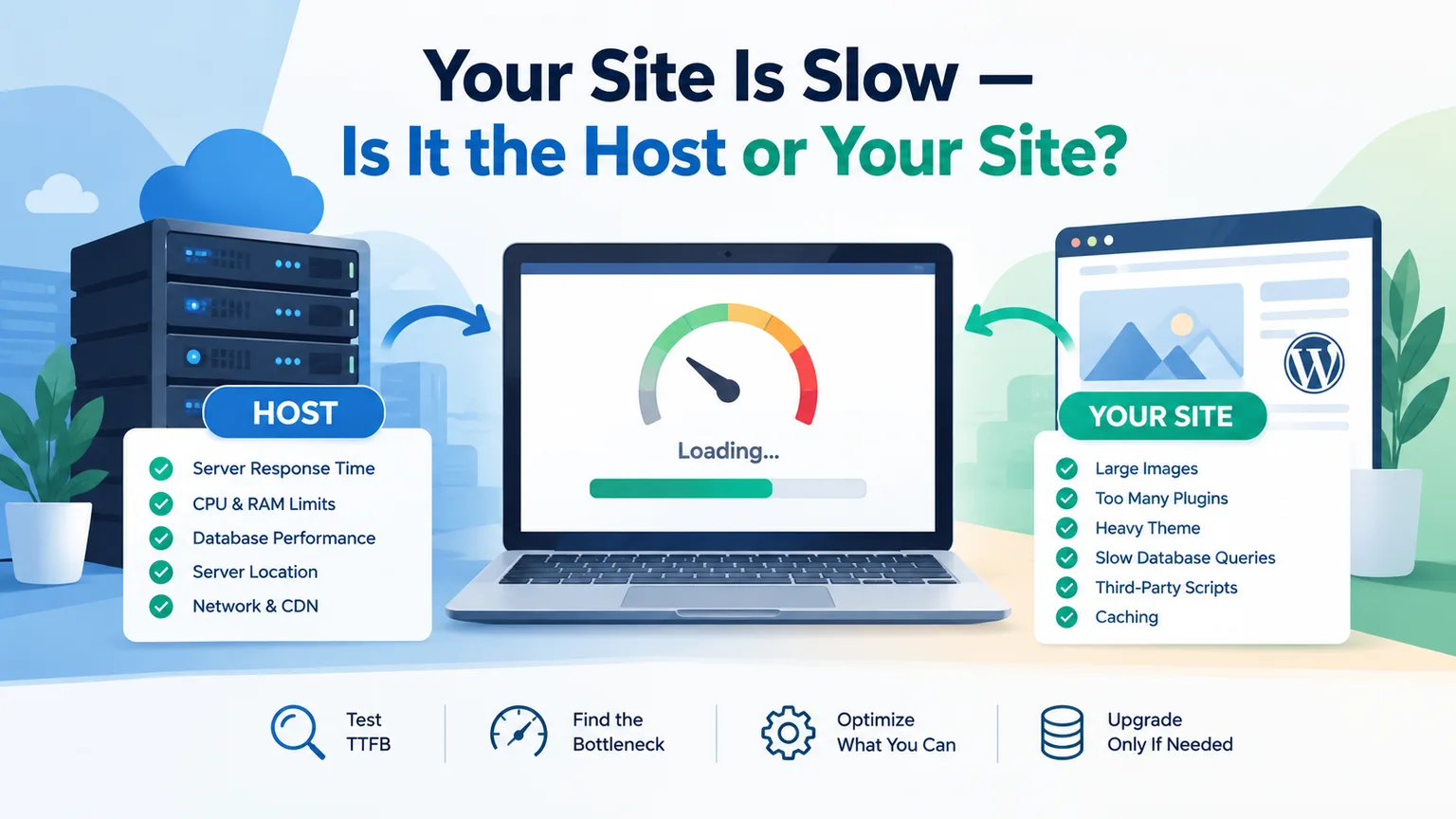
When a website feels slow, the hosting company is often the first thing people blame. Sometimes that is fair. A server can be overloaded. It might also be underpowered or poorly configured. Sometimes, it's just too far from the visitors.
But a slow website is just as often caused by the website itself.
Large images, too many plugins, and a heavy WordPress theme can slow things down. Slow database queries can hurt performance. Third-party scripts and weak caching do too. This can make a good server feel slow. Check which side is causing the delay before paying for a pricier hosting plan.
The quickest way to start is to separate server response time from page rendering time. Upload a simple, plain HTML file to the same hosting account and test it. If the basic page loads fast but your real website is slow, then the host likely isn't the main issue. If even the plain HTML file is slow, the server, network, location, or hosting limits deserve a closer look.
That distinction can save you from spending $50 or $100 more every month on a VPS when the real problem is a 5 MB homepage.
Start With TTFB
TTFB stands for Time to First Byte. It shows how long the browser waits before getting a response from the server.
It is not the same thing as the total page-load time.
A page can have a TTFB of 300ms, but it may still take 4 seconds to load. This delay occurs because the browser must download images, JavaScript, CSS, fonts, and more.
As a practical benchmark, around 200ms is a very strong server response. If response times go above about 600ms, check what the server is doing. Current Chrome guidance separates server response time from full TTFB. A server response time of about 600ms is a helpful diagnostic threshold. Meanwhile, Google sets the "good" TTFB threshold at 800ms.
So don't look at one number and immediately conclude that your host is bad.
Look for a pattern.
A simple test that tells you a lot
Create a file called:
test.html
Put something basic inside it:
<h1>Server test</h1>
Upload it to your hosting account and visit the file directly.
There is no WordPress.
No database query.
No plugin.
No page builder.
No analytics script.
No advertising network.
If your plain HTML file loads fast but your homepage is slow, your hosting server might be working fine. The application sitting on top of it is more likely to be the problem.
If the plain file is also consistently slow, start looking at the hosting environment.
This is one of the simplest diagnostic tests available because it removes most of the website from the equation.
What TTFB Can Tell You About Your Host
A high TTFB does not automatically mean your hosting company is at fault. DNS, redirects, network distance, and application processing shape a visitor's experience. Each factor plays a role in what they see and feel.
But persistent server-side delays can point towards a hosting problem.
Several things are worth checking.
CPU and RAM limits
Shared hosting places multiple accounts on the same physical infrastructure. If your account reaches its CPU or memory limits, requests may take longer to process.
This is especially clear when traffic goes up or when a website runs costly database tasks.
A shared server can also have a "noisy neighbour" problem. Another account can suddenly use a lot of available resources. This change impacts the surrounding environment.
That does not mean every slow shared-hosting site needs a VPS. It means you need to establish whether resource limits are actually being reached.
If you're unsure about your hosting setup, check our Shared Hosting vs VPS vs Dedicated guide. Your choice should depend on your specific limits. Don't just assume VPS is always faster.
Database performance
Dynamic websites often have to query a database before they can generate a page.
A WordPress site needs to get several things. It retrieves posts, settings, menus, user info, and plugin data. Then, it returns the final HTML.
If the database is slow or the site is making inefficient queries, TTFB can rise.
The important point is that a slow database does not always mean you need a more powerful server. A poorly optimised query can remain inefficient even after you move to a more expensive machine.
PHP version and server software
Older PHP versions can affect both performance and compatibility.
Check if your hosting account uses an old PHP version. First, see if your application and plugins can work with a newer version. Don't assume the server is too slow right away.
Server configuration matters too. PHP workers, process limits, and memory limits all affect how fast requests are handled. Other settings also play a role.
Entry-process limits
Some shared hosting plans limit how many processes or requests your account can manage at once.
A site can therefore have plenty of disk space and still struggle when multiple visitors arrive at once.
This is another reason not to judge hosting by storage alone.
The same principle applies to other hidden limits such as inodes. A site might have lots of free disk space. But it can hit an inode limit if it has too many files. Our guide to inodes explains why hosts warn about them. It provides more details on this difference.
What If the Host Is Fine?
This is where many website owners go wrong.
They notice a slow PageSpeed score. They think the server is the problem, so they upgrade their hosting plan.
Then nothing changes.
Why?
Because the browser still has to process everything the website sends.
A faster server cannot magically turn an oversized image into a small one. It cannot remove 30 unnecessary JavaScript files. It cannot fix a theme that loads resources the page does not need.
Uncompressed images
Images are one of the most common reasons for slow pages.
A modern article might contain several images, a featured image, logos, icons and background graphics. If those files are much larger than their displayed dimensions, the browser has to download unnecessary data.
Converting images to modern formats, resizing them right, and compressing them can really help.
Image optimization boosts visitor experience, no matter your hosting plan.
Too many plugins
Plugins are not automatically bad.
The problem is what each plugin does.
A plugin can add:
- Database queries
- CSS files
- JavaScript
- Scheduled tasks
- External requests
- Background processing
Ten lightweight plugins can be less of a problem than one badly written plugin.
If your site is slower after adding a new feature, test that feature first. Don't rush to blame the server.
Render-blocking CSS and JavaScript
Browsers cannot always display a page immediately because they may need to download and process CSS and JavaScript first.
Some scripts are necessary. Others are not.
Third-party services can create extra requests. These include analytics, ad systems, chat widgets, social media embeds, and tracking tools. None of these requests relate to your hosting server.
It's important to check a page that seems slow in a browser but has a good TTFB.
Caching
Caching changes the amount of work your server has to perform.
Without caching, a dynamic page may require the server to run PHP, query the database and build the response for every request.
With effective page caching, many visitors can receive a previously generated version instead.
If your site does not use appropriate caching, investigate that before upgrading hardware.
Don't Forget Third-Party Scripts
Your server is not responsible for every file your browser loads.
Suppose your website loads:
- Google Fonts
- An advertising network
- A live chat widget
- Analytics software
- Social media embeds
- A review widget
- An external video player
Those services can introduce their own network delays.
This is why a website can have a good server response but still feel slow.
When looking at a waterfall chart, check which domains are responsible for the longest requests. If most of the delay comes from third-party domains, moving from shared hosting to a VPS will not solve that particular problem.
Server Location Matters More Than People Think
Physical distance also affects the experience.
If your server is in India and most visitors are in the United States, requests travel farther. They would be faster if the server were closer.
That does not automatically mean you should move the server.
A CDN can help by caching static assets closer to visitors. Images, CSS, JavaScript, and fonts can be served from edge locations. This means they don't have to travel from the origin server for each request.
This is particularly useful for websites with an international audience.
It is also why bandwidth and speed should not be confused.
A hosting plan's monthly transfer allowance tells you how much data you are allowed to serve. It does not directly tell you how quickly your website will load.
To check if your transfer allowance is enough, use our bandwidth estimator. It helps estimate usage based on visits, pages per visit, and page weight.
How to Read Core Web Vitals Without Getting Lost
Three metrics matter most when looking at Google's Core Web Vitals:
| Metric | What it measures | Good target |
|---|---|---|
| LCP | How quickly the main content appears | ≤ 2.5 seconds |
| INP | How quickly the page responds to interactions | ≤ 200ms |
| CLS | How stable the layout remains while loading | ≤ 0.1 |
These are not three different ways of measuring "server speed".
LCP is about loading performance.
INP is about responsiveness when users interact with the page.
CLS is about visual stability.
Google recommends evaluating these metrics at the 75th percentile, which means the results should represent the experience of most users rather than one unusually fast or slow test.
Lab data is not the same as real-user data
This distinction matters.
A Lighthouse or PageSpeed Insights test can give you lab results under a controlled testing environment.
Field data, like Chrome UX Report data when it's available, shows real users. It reflects actual devices, networks, and locations.
Your computer on a fast connection may load a website quickly. But mobile visitors on slower networks often have a different experience.
That is why one test should not be treated as the final verdict.
Run multiple tests.
Test different pages.
Test mobile as well as desktop.
Look for patterns.
When Should You Actually Upgrade Hosting?
Upgrade when you have evidence that the hosting environment is the constraint.
For example, you may have:
- Consistently high CPU usage
- RAM exhaustion
- Repeated process-limit warnings
- Slow server response even for simple pages
- Database performance problems that remain after optimisation
- Traffic that regularly pushes the account beyond its limits
- A workload that shared hosting simply cannot handle
If your homepage is too large, images aren't optimized, and you have many plugins or third-party scripts, a VPS might not be the best option.
A VPS does not automatically make a slow website fast. It can simply make a slow website more expensive.
That is the honest part of this decision.
A better way is to improve what you have. Measure the results, then check if the remaining issue truly relates to server capacity.
If you eventually reach that point, your next question should be what the VPS will actually cost. Our VPS cost guide explains why the advertised monthly price is only one part of the calculation.
To compare shared hosting, VPS, and dedicated infrastructure, use our hosting cost calculator. It helps you see the total cost, not just the monthly price.
A 10-Step Slow Website Checklist
Before contacting your host or buying a more expensive plan, work through these checks in order:
- Test a plain HTML file. If it is slow too, investigate the server and network.
- Check TTFB. Look for a consistent pattern rather than one isolated result.
- Check CPU and RAM usage. See whether your hosting account is actually hitting its limits.
- Check PHP and server versions. Make sure your software stack is not unnecessarily outdated.
- Test your database. Look for slow queries and unnecessary database-heavy plugins.
- Compress and resize images. Check your largest page assets first.
- Review plugins and scripts. Remove features you no longer need and test heavy plugins individually.
- Check caching. Make sure pages and static resources are being cached appropriately.
- Check third-party requests. Ads, fonts, chat tools and tracking scripts can add significant delays.
- Check visitor location and CDN use. If your visitors are far from the origin server, consider whether edge caching would help.
Only after these checks should you decide whether your hosting plan is actually the problem.
The Bottom Line
A slow website does not automatically mean you have a slow host.
The easiest way to separate the two is to test the server independently. A plain HTML file gives you a useful baseline. If that loads fast, but your actual website takes time to show up, focus on the site itself.
If the basic file is slow, check these things:
- Hosting resources
- Server setup
- Database performance
- Server distance
The same principle applies when deciding whether to upgrade.
Don't buy more server because a speed-testing tool gave you a disappointing score. Find the bottleneck first.
Sometimes the solution is a better host.
Sometimes it is better caching.
Sometimes it is a 500 KB image instead of a 5 MB one.
Sometimes, the easiest way to boost performance is to remove things your website never needed.
Provider Disclaimer
Provider names mentioned in related examples are for illustration only, not recommendations. Nobody pays to be named here.
Common questions
How can I tell if my hosting is making my website slow?
Start by testing a plain HTML file on the same hosting account. If the simple file loads fast, but your main website is slow, something is wrong. The issue might be with your site's code, plugins, database, or assets. If the plain HTML file is slow, check the hosting environment and network.
What is a good TTFB for a website?
A TTFB around 200ms is a strong result, while consistently higher response times deserve investigation. TTFB is just one part of performance. Google says a TTFB under 800ms is in its "good" range. The important thing is to look at consistent results rather than one isolated test.
Can shared hosting make my website slow?
Yes, it can, particularly when your account reaches resource limits or the shared environment is under heavy load. Other accounts on the same system can affect resources in some hosting setups. That does not mean every slow website on shared hosting needs a VPS.
Will moving to a VPS automatically make my website faster?
No. A VPS offers more control and resources. It won't fix issues. These include poor image optimization, too many plugins, heavy themes, and extra JavaScript. If the website is the bottleneck, switching to a VPS might just raise your hosting costs. It won't fix the real issue.
Can large images slow down a website even if the server is fast?
Yes. Large, uncompressed images slow down downloads, especially for mobile users. Resize images to their display size and use the right compression. This cuts down page weight without needing to change your hosting plan.
Do too many WordPress plugins make a website slow?
They can, but the number of plugins alone does not determine performance. Plugins vary greatly in what they load and how much processing they require. A single poorly optimized plugin can cause more performance issues than several lightweight ones.
What is the difference between TTFB and page-load time?
TTFB measures how long it takes before the browser receives the first byte of the server's response. Page-load performance is about how fast a page loads. It involves downloading and processing HTML, CSS, JavaScript, images, fonts and other resources. A website can therefore have a good TTFB and still take several seconds to become fully usable.
What are Core Web Vitals?
Core Web Vitals are metrics from Google that measure user experience. They focus on three key areas: loading speed, responsiveness, and visual stability. The three metrics are LCP for loading, INP for interaction, and CLS for layout stability. They show how a page works for users, but don't just see them as a basic speed measure.
Why is my website fast in one test but slow in another?
Performance tests can use different locations, devices, connection speeds and testing conditions. Lab tests give precise measurements, but field data shows real users in real settings. Run multiple tests and look for a consistent pattern. Don't base your hosting decision on just one score.
Can server location affect website speed?
Yes. The farther visitors are from the origin server, the longer their requests and responses must travel. A CDN helps by delivering cached static content from nearby locations. This is especially useful for websites with visitors from different countries.
Does more bandwidth make a website load faster?
Not necessarily. Bandwidth allowance shows how much data your hosting plan lets you move. It tells you the limit for data transfer. Website speed relies on several factors. These include server response, page size, network conditions, caching, and browser processing. Having a large bandwidth allowance does not automatically make a page faster.
Should I upgrade my hosting if my PageSpeed score is low?
Not immediately. First identify what is causing the poor score. Check TTFB, images, caching, JavaScript, CSS, plugins, database performance, and third-party requests. Do this before upgrading. If the site is optimized but still using too much CPU, RAM, or processes, upgrading the hosting could be a good idea.
How do I know when my website has outgrown shared hosting?
Look for measurable limitations rather than simply increasing traffic numbers. If you hit CPU or RAM limits, see warnings, or experience slow responses, it's time to think about a VPS. If your workloads are too heavy for shared hosting, a VPS can help. If those problems are not present, optimisation may be the better first step.
Is a VPS worth paying for if my website is slow?
It depends on what is actually causing the slowdown. If your site is optimized but the server is still a bottleneck, a VPS can give you the resources and control you need. If the website itself is inefficient, paying for a VPS will not automatically fix it.