Shared Hosting vs VPS vs Dedicated: Which One Does Your Site Actually Need?
Most sites are on the wrong plan — either paying for capacity they never touch, or squeezed onto a server that buckles at the worst moment. Here is how to know which one you are on.
Hosting companies will tell you that these three options represent a progression, a ladder that you climb as you grow and scale. And they are right, but only partially, because the differences are more in terms of who is responsible for what in case of a problem, and how much of a shared machine you are occupying. And once you realize that, the choice is obvious. Get it wrong and you will either overpay for years on capacity you never touch, or spend a launch day watching your site time out while a plan that looked fine on paper buckles under real traffic.
This guide walks through what each tier actually gives you, where the marketing glosses over the parts that will bite you later, and — more usefully — how to tell which side of the decision you are actually on before you sign up for another year.
The one thing every tier has in common
Whatever you buy, you are renting a slice of a computer in a datacentre. The differences come down to three questions:
- How much of that computer is guaranteed to you?
- Who patches the operating system and fixes it at 3am?
- How much can you change?
Shared hosting gives you a small unguaranteed slice, hands all responsibility to the host, and lets you change almost nothing. A dedicated server gives you the whole machine, hands all responsibility to you, and lets you change everything. VPS sits between them, and is where most growing sites belong.
Shared hosting: renting a room in a shared house
For shared hosting, the website is stored on the server with other websites. Usually, there are tens or hundreds of other websites on one server. Users are provided with a certain share of the server's resources. The host manages server resources such as the operating system, security updates, software, web server, and backups.
The prices for such services are usually the lowest, about $2-$15 per month. The low end is almost always a promotional first-term price that rises sharply on renewal, sometimes by 200–300%.
What you actually get: enough capacity for a brochure site, a small blog, a portfolio, or a new business site that has not found its audience yet. Modern shared hosting is genuinely decent — far better than its reputation from a decade ago. NVMe storage, HTTP/2, free SSL and one-click WordPress are standard now.
Where shared hosting hurts
Noisy neighbours. Another site's traffic spike or badly written script can slow yours down. Good hosts contain this with per-account resource limits; cheap hosts oversell and do not.
Resource ceilings that are not on the pricing page. Plans advertise "unlimited" bandwidth and storage, then quietly enforce limits on CPU seconds, "entry processes," inodes (the total files in your account — a media-heavy WordPress site hits this fast), concurrent connections and database query time. These are the limits you will actually hit, usually buried in the terms of service rather than the comparison table.
No root access. You cannot install server software, change PHP flags, add Redis, or tune the web server — you work within what the host provides.
Shared IP reputation. Email deliverability can be affected by other accounts on the same IP. Use a dedicated email service rather than the host's mail server and this stops mattering.
Who should stay on shared hosting
If your site gets under roughly 25,000 visits a month, is mostly static content, and does not run anything heavier than WordPress with a normal plugin set, shared hosting is very likely the right answer. Upgrading will not make it faster — at that scale, page weight and missing caching are almost always the real bottleneck, and both follow you to a more expensive server.
VPS: renting your own apartment
A virtual private server uses a hypervisor to slice one physical machine into isolated virtual machines. You get a defined allocation of CPU, RAM and storage that other tenants cannot borrow, plus root access.
What it costs: $10–$80 a month unmanaged, $30–$200 managed.
What improves: guaranteed resources (a neighbour's spike no longer becomes your outage), full control to install specific software and tune the stack, more predictable performance, and your own IP if you send email directly.
What gets harder: you are now the system administrator, unless you pay for a managed plan.
Managed vs unmanaged, honestly
This is the decision that trips people up more than the VPS choice itself.
Unmanaged gets you a bare OS and an IP address. Yours to handle: initial hardening (firewall, SSH keys, fail2ban), installing and configuring the web server, PHP-FPM and the database, ongoing security patches, SSL renewal, backups you actually test, monitoring, and recovery when something breaks at an inconvenient hour. If you are comfortable in a terminal, unmanaged VPS is outstanding value — four to eight times the resources of a shared plan for a similar price.
Managed costs two to three times more. The host handles the OS layer, usually with monitoring, patching and backups included. "Managed" is not a standardised term — some providers manage only the OS, others help with your application stack too, so ask exactly where their responsibility ends before you buy.
The honest test: if nobody on your team can confidently harden a Linux box and restore it from backup, pay for managed. An unpatched server is more dangerous than a slow one.
Signs you have outgrown shared hosting
Your host has emailed you about resource limits more than once; the site slows noticeably during traffic bumps; you need software the host will not install; time to first byte sits above 600ms even with caching configured; you are running something resource-hungry like a busy store or membership site; or you need staging environments and deploy workflows the control panel does not support. One of these alone is not conclusive — three together means the plan is the constraint.
Dedicated servers: owning the building
A dedicated server is an entire physical machine leased to you alone — no hypervisor, no other tenants, every clock cycle yours.
What it costs: $80–$500+ a month depending on specification, plus setup fees on some providers.
When it is genuinely the right call: sustained high traffic with real database work behind it, compliance requirements that rule out shared infrastructure, specific hardware needs (unusual RAM, disk configuration, a GPU), large databases where you want all the memory to yourself, or licensing priced per physical machine.
The catch nobody mentions: hardware fails, and on a dedicated server that is a support ticket and a wait. Cloud and VPS platforms can often migrate a virtual machine to healthy hardware in minutes; a dedicated box with a dead drive is down until someone walks into the datacentre. Weigh that against the performance gain honestly — for many workloads, two mid-sized VPS instances behind a load balancer beat one dedicated server on both resilience and cost.
A side-by-side comparison
| Shared | VPS | Dedicated | |
|---|---|---|---|
| Typical monthly cost | $2–$15 | $10–$200 | $80–$500+ |
| Resources | Shared pool | Guaranteed slice | Entire machine |
| Root access | No | Yes | Yes |
| You maintain the OS | No | Unless managed | Unless managed |
| Handles traffic spikes | Poorly | Reasonably | Well |
| Recovery from hardware failure | Automatic | Usually fast | Manual, slower |
| Setup effort | Minutes | Hours to days | Days |
| Good for | Small sites, blogs | Growing sites, stores | High traffic, compliance |
Cloud hosting: the fourth option
The three-tier model predates cloud platforms. Cloud hosting is closest to VPS in what you get, but bills by usage and can scale horizontally — you add instances during a spike and remove them afterwards.
Worth considering when your traffic is genuinely spiky, you want infrastructure defined in code, or you need to scale beyond one machine. Worth avoiding when your traffic is steady and predictable — usage billing is excellent for variable load and expensive for constant load, so a fixed-price VPS is usually cheaper.
Managed WordPress hosting sits outside this model too: typically containers on cloud infrastructure, tuned specifically for WordPress with caching and updates handled. You pay a premium and lose some flexibility, and for a business that just wants a fast WordPress site without thinking about servers, that trade is often correct.
The mistake almost everyone makes
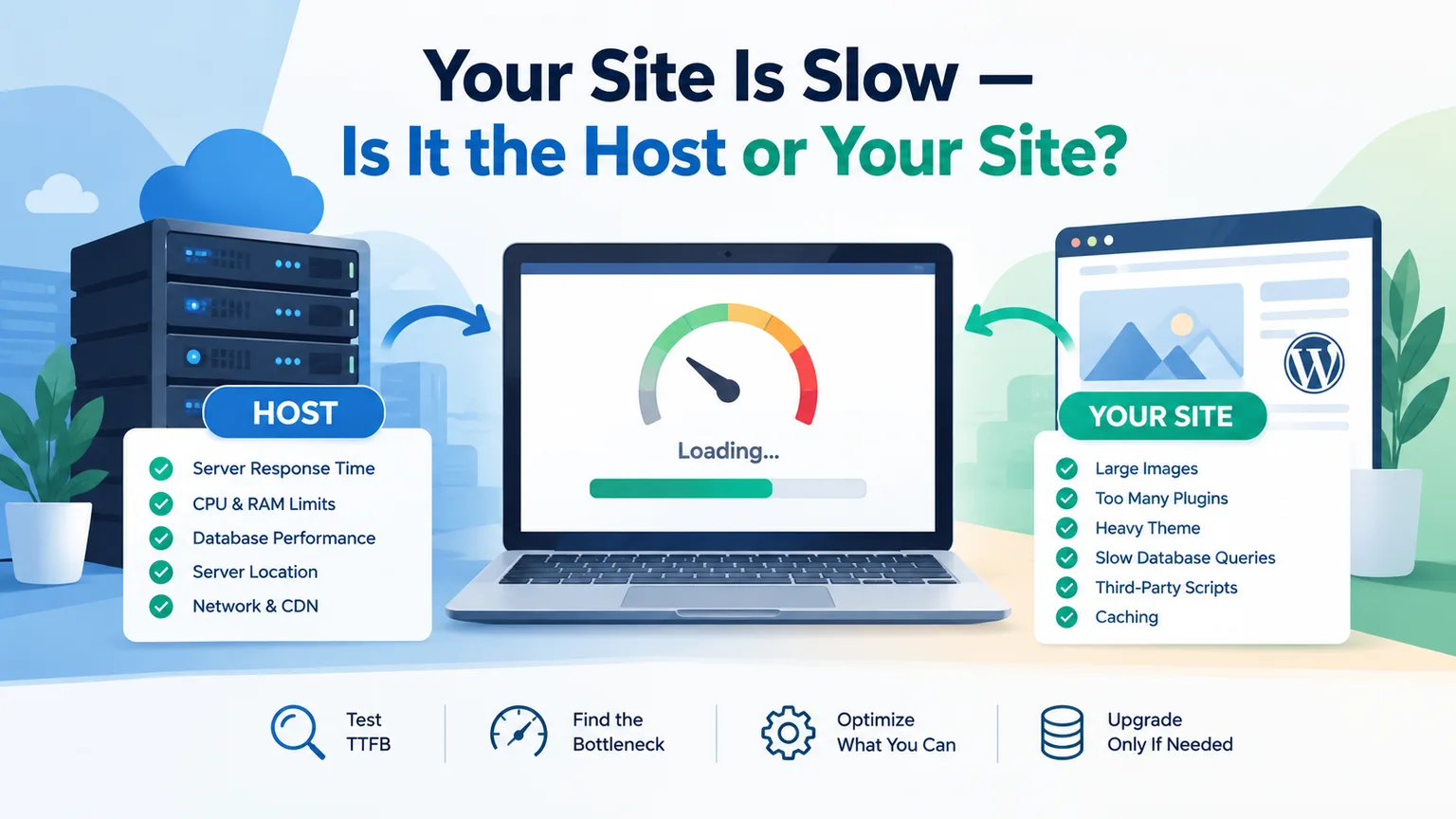
People upgrade hosting to fix a slow site. Usually the hosting was never the problem. Before you spend more, check four cheap wins: compress your images (the single largest cause of slow pages), turn on page caching (frequently a tenfold improvement in time to first byte), audit your plugins with a tool like Query Monitor, and put a free CDN in front of static assets.
Do those first. If the site is still slow afterwards, the hosting genuinely is the constraint and upgrading will help. If you upgrade first, you will pay more for the same slow site and learn nothing about why it was slow.
How to actually test whether you need an upgrade
Gather three data points rather than guessing. Time to first byte: a cached page should return in under 400ms; consistently above 600ms means the server is working too hard. Your host's resource graphs: if you are hitting the ceiling daily rather than during rare spikes, you have outgrown the plan. Behaviour under load: even a modest test of 50 concurrent users for a minute tells you a lot — steeply climbing response times mean the plan will not survive a good day. Three green results mean optimise your front end instead; three red results mean upgrade.
Migration: what it actually involves
Moving between tiers is less dramatic than people expect. Set your DNS TTL low a day ahead, copy the files over and export the DB to the new server, test it on the new server with a hosts-file override before actually changing the DNS (this last step is where lots of people get bitten!), put it in maintenance mode for a final sync, then change DNS and leave the old server up for a week (DNS caching, etc).
Most hosts will give you a free migration as a sign up bonus. Take it, but check the results: SSL certificate, forms, tasks, error logs for a day.
What each tier costs over three years
Monthly pricing hides how these compare over the life of a site. Shared hosting at a $3 promotional rate renewing at $11 totals around $430, plus a domain — call it $475. Managed VPS at $50/month runs near $2,000 with off-site backups. Unmanaged VPS at $20/month is $720 in fees, but budget the time too — even two hours a month of maintenance is 72 hours over three years, and pricing your own hours honestly often makes "cheap" unmanaged look less cheap. Dedicated at $150/month totals $5,400 plus any setup fee.
The pattern worth noticing: shared to VPS is roughly a 4x jump in money and a large jump in responsibility. VPS to dedicated is roughly a 3x jump in money for a much smaller jump in capability, because a well-specified VPS already does most of what a dedicated box does — which is why the VPS tier is where most sites should live.
Questions worth asking any host before you buy
The renewal price, not the promotional rate. The actual resource limits — CPU, entry processes, inodes, concurrent connections — a host that will not state them is one that will enforce them without warning. Whether backups are included, how often, how long they're kept, and how you restore one yourself. Whether a staging environment exists. Which PHP versions are available and how to change them. Whether migration is free. The refund policy. And where the datacentres are located, so you pick one near your audience.
Send these as a pre-sales enquiry — the speed and quality of the reply tells you as much as the answers, because that is the same team you will reach when the site is down.
Common mistakes worth avoiding
Buying three years up front for the headline rate before you have tested the host. Choosing on price alone — the gap between a $3 host and an $8 host is usually oversold servers and slower support. Ignoring the control panel, which you will use constantly. Assuming "unlimited" means unlimited — it never does. And not checking the exit path before you commit: confirm you can take a full backup whenever you want, without asking permission.
Choosing, in one paragraph
Start on shared hosting unless you already know you will exceed it. Move to a VPS when resource limits — not page weight — are what is holding you back, and choose managed unless someone on your team genuinely enjoys server administration. Consider dedicated only when a well-configured VPS is measurably running out of room, and check whether two smaller instances would serve you better than one large one. Most sites never need the third step, and there is nothing wrong with that.
How the resources are actually split
More money buys less sharing, more control, and more responsibility — in that order.
Common questions
How much traffic can I push through shared hosting?
It often depends less on the number of visitors and more on how much each request costs. A WordPress blog with properly implemented page caching can handle 25,000–50,000 visitors per month on a shared hosting plan with ease, while the same blog without caching would struggle with 5,000 visitors. Make sure to reduce the page load cost before optimizing your hosting plan.
Will upgrading to a VPS make my website faster?
Only if the server was the reason for slow performance. If your page's cached time to first byte is under 400 ms, it has little to do with the server. Front end optimizations such as asynchronous scripts or image compression are a better place to start. Your server is not the issue if you spend more than 600 ms on the first byte with caching enabled.
Is managed hosting worth the extra fees?
If no one on your team can patch a server, secure the server's SSH access and restore the database from a backup, it's worth it. The fee for managed hosting rarely pushes beyond $100 per month, while a single security breach costs significantly more than that.
What is the difference between VPS and cloud hosting?
Less than one might expect – technically, at least. Both products are essentially a virtual machine running on shared resources. The difference lies in billing - VPS hosting is a fixed price for a set of resources, while cloud hosting typically uses a pay-as-you-go model. These two approaches have different advantages: fixed pricing is better for predictable traffic, while usage-based billing is more cost-effective when traffic is unpredictable.
Is it possible to change hosting providers without downtime?
Yes - contact the registrar and ask them to reduce the DNS propagation time the day before you migrate your site, then migrate your site to the new host, test everything on the new server and then change the DNS records so that your domain name points to the new server.
Is a CDN a necessary addition to a hosting plan?
If you have users who are located far away from your server, it's an incredible value. A CDN is one of the easiest ways to improve the performance of a website with global coverage, and many providers offer generous free tiers. A CDN is not a replacement for a hosting company, but rather an acceleration layer for static resources. Those assets are moved to CDN edge servers, eliminating a significant portion of latency and hosting overhead.
What is WordPress managed hosting?
Essentially, it's a WordPress Optimized VPS, with resources allocated specifically for WordPress and additional management overhead. Managed WordPress hosting typically costs roughly the same as a managed VPS hosting plan. It involves automated platform updates and optimization, but removes flexibility and options for self-management. It's best suited for clients who simply want a WordPress site without engaging in server-level decisions.
What are the signs that I need to upgrade from shared hosting?
There are three main signals - your shared hosting provider warns you that you are maxing out your resources more than once, your website begins to load noticeably slower when there are more visitors and your time to first byte is consistently over 600 ms with caching. One of these indicators alone is rarely a reason to change the hosting provider, but combining any two of these suggests that it may be time to look for a new provider.
What's the difference between managed and unmanaged VPS?
Security. If you can confidently secure the server, patch it and restore it from a backup, you can save the money and get an unmanaged VPS hosting plan. With that said, an unmanaged VPS typically costs four to eight times more than shared hosting for similar resources, while managed hosting has a comparatively smaller price increase. If you're unsure about any aspect of server maintenance, pay for the managed option - a vulnerable server is much worse than an unproductive one.
When would I need a dedicated server?
If you have predictable, extremely heavy traffic with significant database load, there are compliance requirements that forbid you from using shared resources or you need specific hardware resources such as GPU, a dedicated server is worth considering. In most cases, however, two properly configured mid-tier VPS servers with a load balancer in front of them can handle the same traffic as a dedicated server while providing better redundancy at a lower price than a single dedicated server.
What should I ask before buying a hosting plan?
Always ask about the renewal price, ask if there are any limitations to resources on the selected plan, ask whether hosting includes backups and how you can restore a site from backups, ask if a staging environment is available and what refund policy is in place. Send those questions to the sales department as well – the value of an answer speaks volumes about the company.
My website is slow – what gives?
Your hosting is rarely the problem. First, optimise your images and enable page caching if they are not already enabled. Take a look at the plugins and disable the ones you do not need. Consider using a CDN. If your website is still slow after these measures, your hosting is most likely the cause.