
How Much Does a WordPress Site Actually Cost Per Year?
WordPress software is free. Running a WordPress site is not. A basic self-hosted site usually runs $100 to $500 a year before any developer work — and a small business site or a WooCommerce store can cost considerably more.
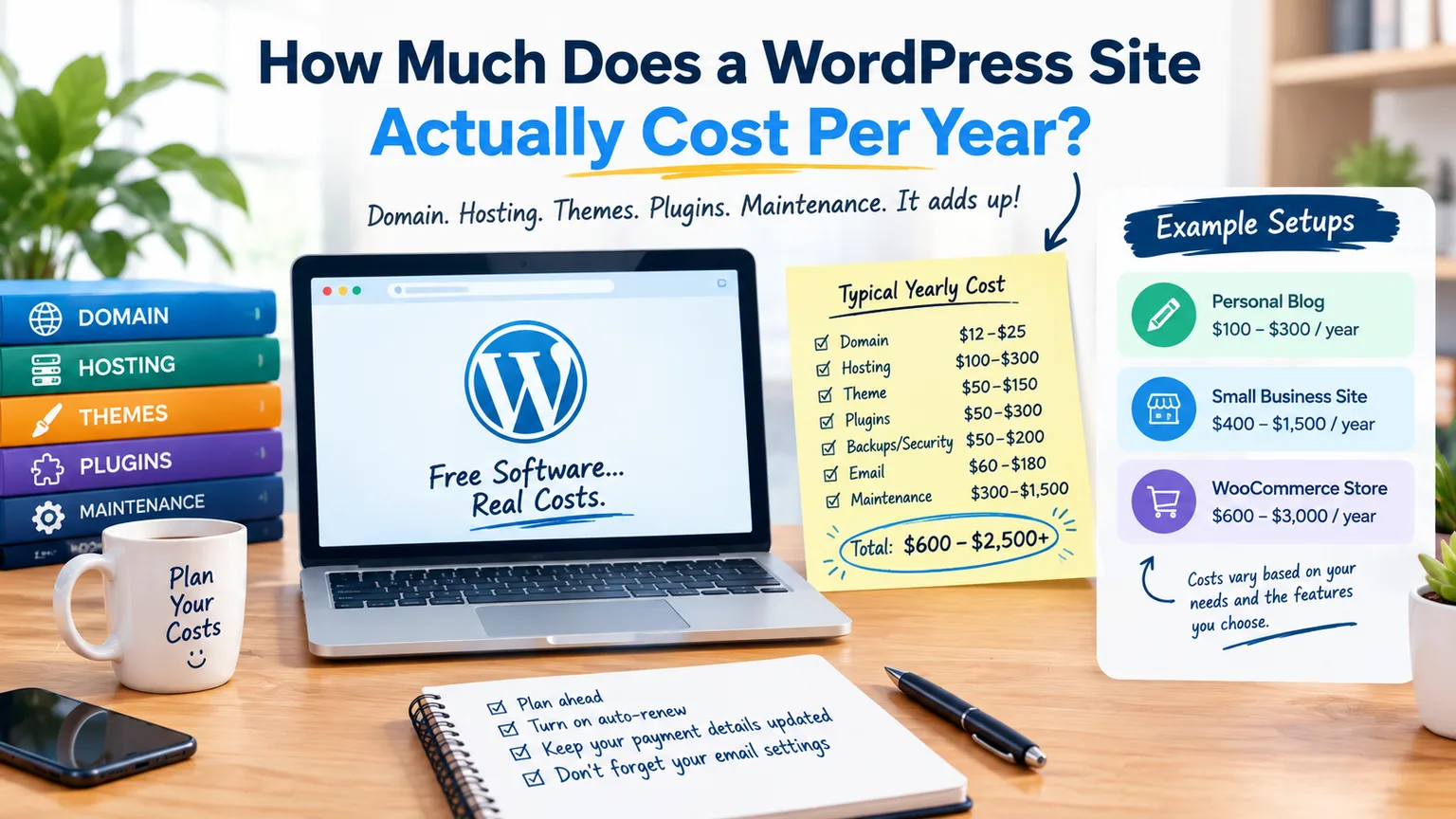
WordPress software is free. Running a WordPress site is not. When you add a domain, hosting, and email, there is a yearly cost. Themes, plugins, backups, and maintenance also add to this cost. For a basic self-hosted WordPress site, plan on spending about $100 to $500 a year. This amount is before any major developer work. A small business site can cost between $500 and $1,500 or more. In contrast, a WooCommerce store can be much pricier.
One key point is this: WordPress.org gives you free, open-source software. You host it yourself. WordPress.com is a hosted service. It bundles hosting and other features into its plans. This article mainly covers self-hosted WordPress.org sites.
The Yearly Cost of a WordPress Site
There is no single WordPress price. These are planning ranges rather than fixed market prices. A simple blog can stay inexpensive, while a business site with premium software and regular maintenance can cost much more.
| Cost | Minimum | Typical | Higher |
|---|---|---|---|
| Domain | $10–$15/yr | $12–$25/yr | $25–$60+/yr |
| Hosting | $40–$100/yr | $100–$300/yr | $300–$900+/yr |
| Theme | $0 | $50–$150/yr | $150–$500+/yr |
| Plugins | $0–$50/yr | $50–$300/yr | $300–$1,000+/yr |
| Backups/security | $0–$50/yr | $50–$200/yr | $200–$600+/yr |
| $0–$60/yr | $60–$180/yr | $180–$600+/yr | |
| Developer/maintenance | $0–$300/yr | $300–$1,500/yr | $1,500–$5,000+/yr |
| Yearly total | $50–$600 | $600–$2,500 | $2,500–$8,000+ |
These figures are for budgeting, not a promise that every site will fall inside them. The biggest variable is usually not WordPress itself. It is how much software, support and maintenance the site needs.
Three Example WordPress Setups
1. Personal Blog
A personal blog can be inexpensive. For basic shared hosting, you'll need a regular domain. A free theme and mostly free plugins are also required. Plan to spend about $100 to $300 each year. Your own time is the cost that does not appear on the invoice.
You may spend nothing on a premium theme or developer support in a quiet year. You still need updates, security and usable backups.
2. Small Business Site
A small business site often requires more. You might need a premium theme or design work. Forms, SEO tools, and marketing tools are also important. Don't forget about business email, stronger backups, and occasional tech support. Plan for about $400 to $1,500 each year. Regular development can raise this amount.
If the site gets leads or inquiries, a maintenance budget is often better. It's usually a smarter choice than adding another plugin.
3. WooCommerce Store
WooCommerce is free and open source. However, running a store involves costs. You need to pay for hosting, payment processing, extensions, backups, security, and maintenance. A small store might need about $600 to $3,000 each year. This is before any big development costs or high transaction volumes.
WooCommerce states that hosting for most stores costs between $25 and $350 each month. Extensions usually range from $29 to $299 per year. Payment processors charge transaction fees. So, you can't calculate store costs from hosting alone.
Year One vs Year Two
One easy way to underestimate WordPress costs is to look only at the first invoice. Hosting companies and domain registrars often have special introductory prices. But when it's time to renew, you'll pay the regular rate.
For a closer look at this problem, read Why Did My Hosting Renewal Price Triple?
Premium themes and plugins can work the same way. A license might seem cheap in the first year. But remember, you need to renew it each year for ongoing updates and support.
Always check whether a product is one-time or recurring before adding it to your budget.
Premium Plugins Add Up
Many WordPress plugins are free, and plenty of sites can stay mostly free. Costs go up when you add paid tools. This includes forms, backups, SEO, security, memberships, analytics, and ecommerce.
Five small annual licences can become a noticeable yearly bill.
Before buying, ask these questions:
- What problem does the plugin solve?
- Is the free version sufficient?
- Does the license renew?
- What happens if you stop paying?
Themes Are Not Always One-Time Purchases
A free theme may be enough for a basic site. A premium theme saves design time. A custom theme costs more since you pay for development.
A premium theme is not automatically a one-time expense. Some licenses need annual renewals for updates and support. So, check the renewal terms before just looking at the first-year price.
Maintenance Has a Cost Even If Nobody Bills You
WordPress needs care. Check for core updates, plugin and theme updates. Don't forget backups and security checks. You may also need to troubleshoot sometimes. Next, there are annoying tasks. For example, a plugin update might break a form. Also, a PHP change can reveal an old compatibility issue.
You can do this yourself, hire a freelancer or use a maintenance service. The useful question is how much your time is worth.
Our hosting cost calculator can help you include your own time when comparing the real cost of different hosting setups.
WooCommerce Has Extra Costs
A normal blog can run without processing payments. A store cannot. Payment processing fees are included in the cost of each sale. Paid shipping tools and tax integrations can cost money. Subscriptions, product feeds, and other extensions also lead to ongoing costs.
WooCommerce's core is free, but costs rise as your store gets more complex. A busy store may need stronger hosting. This is because database and checkout activity can be much heavier than just a simple blog.
Where Saving Money Is Fine
Start with a free theme if it does the job.
Use free plugins when they genuinely meet the requirement.
Remove plugins you no longer need.
Consider a multi-year domain registration if the price makes sense.
Handle routine maintenance yourself if you have the time and knowledge.
Where Cutting Costs Can Backfire
Skipping backups is the obvious example. If a site breaks and there is no usable restore point, the eventual repair can cost far more than a backup system.
Cheap hosting can get costly if your account often hits resource limits.
If you see warnings about file counts, read What Are Inodes?
And do not assume a larger hosting plan will automatically fix a slow website. Use Your Site Is Slow — Is It the Host or Your Site? to work through the possible causes before upgrading.
Do You Need a VPS?
Most small WordPress sites do not need a VPS immediately. Shared hosting works well for modest traffic. It's good as long as you don't hit resource limits often.
As a site grows, the next step might be a better shared plan, managed WordPress hosting or a VPS. The right choice depends on the workload, not simply on the idea that a more expensive server must be faster.
If you are considering a VPS, read How Much RAM and CPU Does a VPS Actually Need?
Do Not Forget the Domain
A domain is a small part of the yearly budget, but it can create a much bigger problem if it expires.
See What Happens When a Domain Expires?
Keep the registrar email up to date. Enable auto-renew if it fits. Also, check that the payment method works when it's time to renew.
What Should You Budget Each Year?
For a basic self-hosted WordPress blog, you can expect to spend about $100 to $300 a year. This is reasonable if you keep things simple and handle most of the maintenance yourself. A small business site may be more comfortable with a $400–$1,500 yearly budget. A WooCommerce store can cost between $600 and $3,000 or more. The price can go up with more traffic, extra features, and payment volume.
These are planning ranges, not quotes. Your actual cost depends on a few key factors. These include hosting, domain, licenses, email, and support. It also depends on how much work you do yourself.
The useful number is not the cheapest possible WordPress site. It is the yearly cost of a setup that remains secure, backed up, maintainable and fast enough for what you need.
Provider Disclaimer
Prices and ranges in this article are planning figures, not quotes or recommendations. Costs for hosting, domain, theme, plugin, email, development, and payment processing differ. They depend on the provider, location, plan, and renewal term. Check current pricing and renewal terms before purchasing. Nobody pays to have their name mentioned here.
Price Check Note
We verified WooCommerce pricing with its current public information as of September 2026. The yearly ranges are planning figures because WordPress costs vary. Factors include site size, region, and chosen services.
Common questions
Is WordPress free?
The WordPress.org software is free and open source. You still pay for services around it. This includes hosting, a domain, email, premium software, and maintenance.
How much does a basic WordPress blog cost per year?
You can run a simple self-hosted blog for about $100 to $300 a year. This includes basic hosting, a free theme, and mostly free plugins. Your own maintenance time is not included.
How much does a small business WordPress site cost per year?
A good planning range is about $400 to $1,500 each year. This amount varies based on hosting, premium software, email, and maintenance costs. Sites needing regular development can cost more.
How much does a WooCommerce store cost to run?
A small store might need about $600 to over $3,000 each year. This is before considering any big development costs or high transaction volumes. Hosting, extensions, maintenance and payment processing all contribute.
What is the difference between WordPress.org and WordPress.com?
WordPress.org provides the free software you install on hosting you choose. WordPress.com is a hosted service that bundles hosting and other features into its own plans.
Do I need premium plugins?
No. Many sites work well with free plugins. Premium plugins give you extra features. They also provide support, updates, and integrations that free versions lack.
Is a premium theme a one-time cost?
Not always. Many premium themes use annual licences for updates and support. Check the renewal terms before buying.
Why is my second year of WordPress more expensive?
Hosting and domains can have introductory first-term pricing, while renewals use standard rates. Premium themes and plugins may also renew annually.
How much does WordPress maintenance cost?
It can be free if you handle it yourself, or cost hundreds or thousands of dollars per year when outsourced. The amount depends on complexity and how often the site needs work.
Can I run WordPress on cheap shared hosting?
Yes, many small sites can. The key is whether the plan provides enough resources and remains reliable as the site grows.
Do I need to pay for WordPress backups?
Not necessarily. Some hosts include backups, and you can create your own system. What matters is having regular backups stored safely and knowing how to restore them.
What is the cheapest way to run a WordPress site safely?
Use simple, reliable hosting, choose a normal domain, pick a reputable free theme, install only the plugins you need, ensure regular updates, and have a dependable backup system. Saving money by skipping security or backups can cost much more later.